
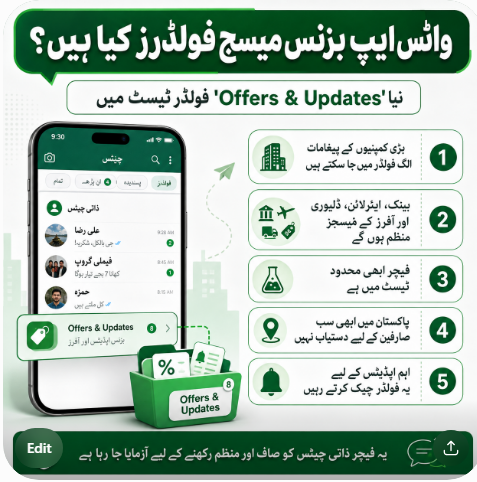
WhatsApp is testing a new “Offers & Updates” folder that may automatically separate messages from large businesses, including banks, airlines and delivery companies, from personal chats.
WhatsApp users often receive transaction alerts, promotional offers, booking confirmations and delivery updates from different companies. These messages can make the main chat screen crowded and make it harder to find conversations with family, friends and work contacts.
To address this issue, WhatsApp has started testing a new system that automatically moves certain business messages into a separate folder named “Offers & Updates.”
The feature is currently being tested on a limited basis and has not yet been released to every WhatsApp user.
What Is the WhatsApp Offers & Updates Folder?
The Offers & Updates folder is designed to collect messages sent by large companies through the WhatsApp Business Platform.
These messages may include:
Discount codes and promotional offers
Bank and payment notifications
Airline booking updates
Courier and delivery notifications
Appointment reminders
Order confirmations
Customer service updates
According to a report published by TechCrunch on July 31, 2026, WhatsApp may move eligible business messages into the new folder several hours after they are received. WhatsApp is reportedly testing different time limits, with messages possibly being moved within a period of up to 24 hours.
This means that a new business message may initially appear in the regular chat list. It could later be transferred to the Offers & Updates folder automatically.
Why Is “WhatsApp Business Message Folders” Trending?
Search interest in WhatsApp Business message folders increased after reports about the new test began circulating online.
Many users searched for the phrase because they wanted to know whether WhatsApp was introducing folders for all chats or changing how business messages appear.
The feature has also attracted attention because millions of people use WhatsApp to receive messages from banks, online stores, airlines, ride-hailing services and delivery companies.
For users in Pakistan, WhatsApp is commonly used for business communication, order confirmations and customer support. A separate business folder could therefore change how users find important updates from companies.
Is the New Folder Available in Pakistan?
There is currently no confirmed announcement that the Offers & Updates folder has been released to all WhatsApp users in Pakistan.
WhatsApp is initially testing the feature with selected partners using the WhatsApp Business Platform. The company is expected to study user behaviour and feedback before deciding whether to expand it more widely.
Pakistani users should not be concerned if they cannot see the folder in their WhatsApp application. Its absence does not mean that the app is outdated or that there is a problem with the account.
Users included in the test may see the feature automatically after updating WhatsApp. However, updating the app does not guarantee that the folder will appear because access is controlled by WhatsApp.
Will Small Businesses Be Affected?
Small businesses and individual users of the regular WhatsApp Business application are not included in the initial test.
The current experiment mainly focuses on messages sent by larger companies using WhatsApp’s enterprise-level Business Platform. WhatsApp may consider including messages from smaller businesses in the future, but no final decision has been announced.
For example, a local clothing shop, home-based seller, electrician or property dealer using the normal WhatsApp Business app is unlikely to have customer messages automatically placed in this folder during the initial testing phase.
Can Users Turn Off Automatic Sorting?
Reports indicate that users included in the test will be able to turn off automatic sorting if they prefer to keep business messages in the main chat list.
The location and wording of this setting may vary during testing. Users should carefully check WhatsApp’s chat or notification settings if the new folder appears on their account.
WhatsApp will decide when an eligible message is moved, although users may be able to disable the feature completely.
Will Important Bank or Delivery Messages Be Missed?
The new feature is intended to organise messages rather than delete or block them.
A message from a bank, airline or delivery company may still appear in the main chat list when it first arrives. It could be moved into the Offers & Updates folder later.
However, users should regularly check the folder if they are waiting for an order update, booking confirmation or important company notification.
Security codes and one-time passwords should still be treated carefully. Users should never share an OTP, banking PIN, account password or verification code with anyone, even when the message appears to come from a known company.
Is This the Same as WhatsApp Lists and Labels?
No. The new Offers & Updates folder is different from the existing Lists and Labels features.
WhatsApp Lists allow users to create customised chat filters to organise conversations. WhatsApp’s official Help Center describes Lists as filters that can help users keep their chats organised.
WhatsApp Business users can also apply Labels to customer chats. A business may create labels such as:
New customer
Pending payment
Order received
Order completed
Follow-up required
These labels are mainly used by business owners to manage customer conversations. The new Offers & Updates folder, however, is being tested for consumers receiving messages from large organisations. WhatsApp provides separate official guidance for using business labels.
What Should Pakistani WhatsApp Users Do?
Users do not need to install a separate application or activate an unofficial service.
Keep WhatsApp updated through the Google Play Store or Apple App Store. Avoid downloading modified WhatsApp applications or APK files from unknown websites.
When the Offers & Updates folder becomes available, review it regularly, especially when expecting a bank notification, courier update, flight confirmation or online order message.
Users should also check the name and number of the sender before opening links or sharing personal information. Fraudsters may copy the name or logo of a well-known business, so a professional-looking WhatsApp profile alone does not prove that the sender is genuine.
What Pakistani Businesses Should Know
Small businesses using the standard WhatsApp Business app are not currently the main target of this feature.
However, businesses should still prepare for a future in which promotional and transactional messages are organised separately. Important messages should be clear, brief and easily understandable.
Businesses should avoid sending repeated promotional messages because excessive communication may encourage customers to mute, block or report the account.
Order updates, payment confirmations and delivery information should clearly mention the business name and the purpose of the message. This makes it easier for customers to recognise legitimate communication.
Frequently Asked Questions
What are WhatsApp Business message folders?
The phrase may refer to WhatsApp’s existing Lists and Labels or the newly tested Offers & Updates folder for messages from large companies.
Is the Offers & Updates folder available to everyone?
No. As of August 2, 2026, it is being tested with selected WhatsApp Business Platform partners and has not been released to all users.
Will WhatsApp delete business messages?
There is no indication that the feature deletes messages. It is designed to move eligible messages into a separate folder.
Can I stop WhatsApp from moving business messages?
Users participating in the test may be able to disable automatic sorting. The exact setting may vary during the testing period.
Does this affect normal WhatsApp Business accounts?
Small businesses and individual WhatsApp Business app users are reportedly excluded from the initial test.
Final Words
WhatsApp’s new Offers & Updates folder could make the main chat screen cleaner by separating promotional and transactional messages from personal conversations.
However, the feature remains a limited test. Pakistani users should wait for an official rollout and avoid websites or applications claiming to activate the folder manually.
Users who receive the feature should check it regularly so they do not overlook an important bank, airline, courier or order notification.